• Skip to secondary menu
  • Skip to main content
  • Skip to primary sidebar
  • Skip to footer
  • Home
  • About Me
    • Privacy Policy
    • Disclaimer, Legal and Media Kit
  • Blog
  • Contact me

A Net in Time

Curriculum and book reviews, faith, homeschooling and more!

  • Art
  • Blogging Helps
  • Faith
  • Homeschooling
  • Poetry
  • Recipes
  • Reviews
  • Writing

child-led learning

Chili

May 19, 2018 By Annette1 Leave a Comment

We found this recipe at Practical by Default for making chili. It said “child friendly” so the lad and I set about testing out that theorem.

These are the ingredients that we used:

2 tbsp of Oil
2 lbs of Ground Beef -precook and drain

1 extra large can Chick Peas
1 can Red Kidney Beans
1 can Navy beans
2 cans 28 Fl oz Tomatoes – one crushed and one diced
1 large Yellow onion
3-4 cloves of Garlic .. we used minced garlic
Spices:
First time we used a pack of chili seasoning,
Second time: Chili powder, red pepper flakes, salt, pepper, tossed in some molasses, made it work.  It’s good to discover the joy of taste testing and figuring out needed ingredients.  Basil, oregano, thyme…

Child friendly chili recipe

For directions… well we cooked the meat, then tossed it and the rest of the ingredients into a crock pot let it cook for six hours or so on high the first time, the second time we put it in for 8 hours on low.

Easy as can be.  We changed up the beans ratio too.. the second time we used a romano bean mix with black beans and white kidney beans.   Beans are beans and they all taste just fine in chili.

Is it child friendly?

YES.. the only thing my lad asked for help with was browning the beef because we were cooking it from mostly frozen and that was a new one for him to do.   It’s been added to his very own recipe folder. 🙂

How to serve:

We ate it as is, or put it on bread or over pasta, also served it once in some taco bowls I’d found on sale.   Chili is really versatile as my son is having fun discovering.   He likes it with applesauce a lot too.

Now it’s your turn.

Have any recipe to share?  Would be great to have them.   Expand our repertoire if you will.

Filed Under: Recipes Tagged With: child-led learning, hands-on learning, recipes

Gardening vs Book Work

May 15, 2018 By Annette1 Leave a Comment

The other day I offered my son a choice…. finish your schooling (doing bookwork) OR help me with some gardening.   He actually stopped to think about it!   🙂   In the end he said “Mom it’s really nice out here, are you sure it’s okay if I help you instead?”

Hands On Learning while being helpful … it’s a win-win in my book.  

Spring gardening with the lad

In the fall we thought we were going to move, so friends of ours asked about getting part of our red currant bush.  I told them sure, take a piece off.  Saw it this spring and realized they had dug the bush up but …. hadn’t covered the roots and what not so figured I’d move it.  It wasn’t hard getting it out…but I couldn’t move it on my own.  The lad to the rescue!  “I’ll help mom, just where do I grab it?”   He took one side and I then other and we got her planted in a new spot.  One that gives us access all around.  Anyways, this granted us the ability to examine the root system of a currant bush.  They are not very deep for the size of the bush and spread out all over.  The root system was probably about as big around as the bush, but only 1/4 the depth of the height.   We were quite surprised at this. 

Red Currant bush, pictured in new location

What else did we do?

Well, I raise rabbits, and in the summer they get greens out of my garden.  A big part of those greens is my large patch of chervil and parsley.   We moved it from the messy, full of weeds patch to a new section of garden, effectively increasing the patch size from a half garden to almost a full garden.   We only moved about half the patch today, the rest I worked on over the course of a week. 

Parsley for bunniesWe moved the black currant bush and discovered we had two of them.  We moved the bigger one where we wanted it, with compost on the roots, then made a temporary home for the smaller one.  Decided we would sell that one if we could.   He made me laugh.  I managed to sell it for $10 and my son’s immediate response was “I want to grow more mom!   Then I can sell them next year!”   WOOT WOOT!  I’m raising a fine entrepreneur.   I taught him how easy it was to start new currant bushes so now the red and black currant bushes have some brick holding down branches waiting to start new plants. Black currant roots are fewer in number and more spindly.   Very easy to dig up and move. 

Black currant bush

Our next task was the bee garden.  We call it that because we have a bumble bee who lives somewhere in the middle of the wood pile. We are fairly sure she lives under the big piece of wood in the middle.  We don’t like to bother her and it’s been fun having her bumble around us this spring on the warm days.  She never bothers us.  Anyways, we pulled out all the dead leftover stuff and tided up the bed, replanted what should grow again. We have a wee bit to do yet, but then we got hungry as we forgot lunch.  

The bee garden, three gardens surrounding a wood covered bees nest

Lunch is an excellent thing to have after a hard days work you know?  Lunch was followed by in rhetoric by Silverdale Press.  It made for an excellent day all round. 

The lad’s joys

  1. discovery of a very large black beetle.  Led him on a search for the name (unsuccessful but it was a cool bug)
  2. Ants! We have two new ant hills in our yard. One I want gone and the other I don’t worry on. The lad wants them all to stay but in the path of a lawn mower is not the best place for an ant nest.
  3. Some of our tadpoles have legs! We have some growing that are very large and take a long time to develop. Going on two years now for some of them. We’re kinda anxious to learn what kind they are.

Filed Under: Homeschooling Tagged With: child-led learning, gardening, hands-on learning

Review: CodeWizardsHQ

May 2, 2018 By Annette1 Leave a Comment

I wanted to share with you about a coding class from CodeWizardsHQ that my son recently completed.  This online coding class had my son intrigued and wanting to do more. The ability to code is an extremely important skill that today’s youth will need for the jobs of tomorrow.  Coding is required in so many positions today, the need for skilled computer savvy people is growing exponentially.   CodeWizardsHQ  also offers homeschool computer programs as well as online coding classes for all students.

CodeWizardHQ

CodeWizardsHQ set up an introductory Class for members of the Homeschool Review Crew.  They had a number of timeslots we could pick from in order to see how their training program works.  I have to admit…. my son wanted it to be much longer.  He didn’t get to complete everything he wanted to due to the limitations of the one hour class and the very new to coding people who were part of his group. 

I thought I would walk you through some of the technical stuff and let my son tell you about his experience later on.  First a bit about the program from CodeWizardsHQ themselves.

What do you get?

As I mentioned earlier, we received a one hour online class to test out their program.   This consisted of getting an email from David and Kevin walking us through the important aspects of the program. An introductory video was used to point out the benefits of using their program to teach coding (teacher support, classroom setting, learning from each other, feedback given), the exponential growth in the need for good coding skills, and how their program work.  Regretfully I was unable to attend, but Kevin nicely sent me a PDF of the slides used in the presentation so I didn’t really miss it!  Wasn’t that sweet of him?  

CodeWizardHQ

My son took the class because we could only have one person on and listening well at a time.   This review will be filled with overheard comments concluding with my son’s overall impression of the class.

At the start of the class, based on what I overheard, the instructor took a moment to learn a few things about each of the students.  I heard my son say “I don’t know what I want to learn, but by what I have seen its an important skill to know” as well as the fact that he has done some coding in the past. 

A quick complaint I heard was “I wish some of the people not talking would turn off their audio as I hear people talking in the background.”  I mentioned to my son that is a hard issue to control and that CodeWizardsHQ had asked people to meet in a quiet area. 

We weren’t initially aware that we would need to have two screens open so it took us a bit of time to get that part figured out.  Once we did, the rest of the class moved smoothly.  They use the Go Meeting program to conduct the teaching part of the program. 

There is another open page with the students private dashboard.  We received a special code that helped us open this page. I assume each person received their own code. The class we took was an introductory one. 

At the top of the dashboard are the controls to learn the programming. The join class button takes you to the Go Meeting app.  Editor is where items are edited, progress lets you see the changes you have made.

As you move to the editor page you will see a page like this.  At times this page will just have a column of grey on the one side with words/names.   And if you click on one of those words you will see either an image pop up or a bunch of code. 

My son was taught with some pre-existing elements, examples follow.

CodeWizardsHQ

By the end my son had officially made a checkerboard of conversation and images.

CodeWizardsHQ

Comments overheard: “I now understand why learning in a classroom takes so much longer now”.  “Some of the students are slow, so I have to wait, I can change anything I want while I wait.”

CodeWizardHQ

Instructor quality?

Good.

Sound?

Instructor good, everyone else horrible.

Ease of use?

“I found it very easy to use. I know a couple of students didn’t get the first thing done”

Do you like it?

Yes. Would have been nice if everyone could have figured it out.

Would you want to take a 12 week course?

Yes I would.CodeWizardsHQ

Anything you would change?

“”What they need to do is have two instructors. One to keep the advanced students going and one to help the ones who have fallen behind.”

“I would have liked them to spend some time explaining what html does rather than just how to change it.”
“Didn’t teach about elements, opening and closing brackets. Would have been better to start completely from scratch.”

“All we were taught was how to change part of an element and how to copy and paste an element.”

“One of the things I liked is that if you made a mistake with your HTML , such as you forgot to make a opening bracket or a closing bracket or if you added them something in that shouldn’t be there, it would pop up in red text if it needed to be changed.”

My lad thoroughly enjoyed being part of this class and would happily take a courses from CodeWizardsHQ if he had a chance to do so.   CodeWizardsHQ coding class

CodeWizards offers several classes, each 12 weeks long.  One hour live class each week which comes with 24/7 access to the code writing platform, email support, one-to-one assistance as needed, weekly progress updates recorded classes along with the necessary web space to complete projects and an online student community.   A certificate is issued for each completed courses. 

CodeWizardHQCodeWizardHQ
I received a one hour introductory class into HTML coding.

Their normal classes run for 12 weeks and at the end of them you will get a certificate of completion.
Online, Coding Classes for Kids,
Three Levels to work through, Certificate upon Completion, Along with Internship.
For Class Pricing
.  
CodeWizardsHQ is not a homeschool curriculum company, but they are open to providing classes during the day for homeschooled students. Learn More Here. 

CodeWizardsHQ coding class

60 members of the Homeschool Review Crew took this class, CLICK HERE to read them.

read

Facebook along with the Facebook group for parents who are interested in coding for their children 
Twitter.
Pinterest.
YouTube.

Filed Under: Homeschooling, Reviews Tagged With: child-led learning, computer Learning, Online

Things I love – Homeschooling Meets Life

April 23, 2018 By Annette1 Leave a Comment

Today starts off the first day of the 5 day blog hop from the Homeschool Review Crew. Everyone who is participating gets to choose their own topic and write on it for five days.   Since life is rather busy for me lately I thought I’d do something easy and fun.  🙂

Things I love is my topic and today I’ll be talking about how I love when homeschooling meets life.    j

Recently hubby started a job working at McDonald’s.  They supplied him with a uniform.  Shirt that fit nicely and pants that were WAY too long.  He didn’t discover the length of the pants until 1/2 an hour before he needed to go in, so being in a pinch, I quickly taught my son how to tack a hem. This is an important skill to have if you need to make an emergency hem.

Day two of Dad’s new job required that tacking to be turned into an actual hem. My lad was eager to learn how to do this so I showed him what to do and off he went. 

He needed to learn how to measure length, the threading of the sewing machine, how to stick pins in for ease of removal, how to guide the sewing foot to ensure an even hem, and so forth.   It was an excellent time of learning.. not only how to sew but how to pitch in when Dad needed help. 

In the end he did a FAR better job than his mother did as his attention to detail ranks up with his dad (and not where his more global minding mother’s is).  🙂

homeschooling meets life

It’s a great thing when a real life need provides an educational opportunity isn’t it?

How have you seen this in your homeschooling journey?


Filed Under: Homeschooling Tagged With: child-led learning, hands-on learning

Review: The Superhero Handbook

August 16, 2017 By Annette1 2 Comments

 I have to admit, this is a cute book. Written in bold, easy to read font with quick easy instructions to get children on the road to making their own Superhero gear.   The Superhero Handbook is just that, a handbook made just for your average superhero, reminding him/her of all things important to superheroes.

Clear Text.   Easy to understand. Easily read by most children in the 7-11 years old bracket. 

Materials lists.  I like how they added the images to add clarity.   As face it, not all children read at the same level.

Clear instructions.   Again with illustrations to keep it straight-forward. Stickers as well to help you embellish your creations.

Some of the ideas are downright clever!   Giant hands! Hoverboards.  Blasters and Electro-magnets.  Let’s make them all!   What perfect fun for a child during summer holidays!

With it comes certificates needed. Oaths to make to protect and serve.   To help each other.  To have a great sidekick.

 My Thoughts:
This is a fantastic book that will be a great boon and idea maker for all the young superheroes among us.   It would be easy to extend the ideas in this book into learning opportunities (should you as parent/teacher desire to do so).  But frankly, I’d had this to my young superhero and say “here’s an idea book for you… run with it!”
 

The Superhero Handbook.
Janet Doyle and Jason Ford
Laurence King Publishing
144 pages
ages: 7-11
Approximate size: 6 x 8

Reviewed for: Raincoast Books

Where can you find it?
 Amazon.ca: The Superhero Handbook: 20 Super Activities to Help You Save the World!

Amazon.com:  The Superhero Handbook: 20 Super Activities to Help You Save the World!

 ——

This post may contain affiliate links – using affiliate links from A Net in Time helps fuel this blog and our homeschool – thank you!

©2006-2017 A Net In Time. All rights reserved. All text, photographs, artwork, and other content may not be reproduced or transmitted in any form without the written consent of the author. A Net In Time . We are a participant in the Amazon Services LLC Associates Program, an affiliate advertising program designed to provide a means for us to earn fees by linking to Amazon.com and affiliated sites

Filed Under: Uncategorized Tagged With: Book Review, Books for Children, Books for Upper Elementary, child-led learning, delight-directed learning, hands-on learning, Raincoast, Review

Art Book: Miniscapes – Create Your Own Terrarium

July 19, 2017 By Annette1 2 Comments

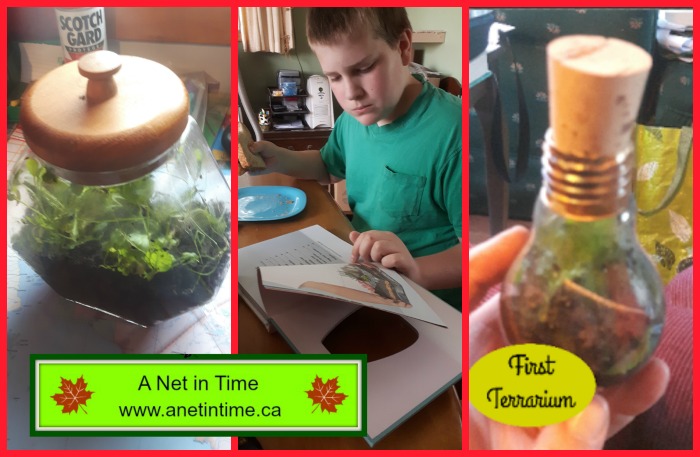
I recently contacted my “person” at Raincoast and mentioned that my lad was into making terrariums lately so she very kindly sent me a book that she thought might be a boon to him… and it was!   Let me tell you about Miniscapes: Create your own Terrarium.  I know I know..not your typical art book, but making a terrarium is a form of art you know?   Can you put different mediums together in a way that will balance and create something beautiful?   Miniscapes helps you to gain the know-how to do this yourself.

 
 I love the logical step up in Miniscapes.  Walking the reader through what a terrarium was and how it worked.  Being walked through all the parts of a terrarium, learning why you need the different layers, the types of plants you can use and more.  The Close of Miniscapes leaves you with several projects you can complete to get your feet wet, or to at least give you ideas for creating your own.   It’s a rather neat book.

The first half of Miniscapes is devoted to teaching the reader about the various plants, and parts of a terrarium.  The different styles of glass bowls, types of rocks, plants, substrate, tools, and accessories . 

I found the text easy to read and understand.  The author was very good at explaining how everything works, making this an ideal book for a novice to terrariums, while including lots of projects to intrigue the more seasoned.

 
The Projects, more than 15 projects, each with an ingredients list, with step by step instructions for completing them.

My Thoughts:
This is a helpful little book, full of ideas and images and creations.   It’s great to look through to garner ideas for different types of terrariums, or to actually create one of them as written.  My son liked it and didn’t want me to add it our “let’s rehome it” pile so it will sticking around for a while.  🙂  (not many books make it to that status which tells you something eh?)  🙂

But it’s a great book to teach you how to make your own garden art form. 

Oh!   And check it out!   My lad made his own terrariums!!!

Miniscapes – Create your own Terrarium
Clea Cregan
Hardie Grant Books
Pages: 160
Approximately 8 x 8 inch square 
Type: Hardcover

Reviewed for: Raincoast Books

Where to find it: 
Amazon.ca: Miniscapes: Create Your Own Terrarium

Amazon.com: Miniscapes: Create Your Own Terrarium

——–
This post may contain affiliate links – using affiliate links from A Net in Time helps fuel this blog and our homeschool – thank you!

©2006-2017 A Net In Time. All rights reserved. All text, photographs, artwork, and other content may not be reproduced or transmitted in any form without the written consent of the author. A Net In Time . We are a participant in the Amazon Services LLC Associates Program, an affiliate advertising program designed to provide a means for us to earn fees by linking to Amazon.com and affiliated sites

Filed Under: Art, Uncategorized Tagged With: Art, Art Books, Art Series, child-led learning, delight-directed learning, hands-on learning, Science, Series

Field Trip: Penn’s Cave

July 7, 2017 By Annette1 4 Comments

Penn’s Cave in Pennsylvania was a huge amount of fun for all of us to attend.  I want to tell you all about it.  🙂    I don’t know if my images are any good at all… but you’ll cope right?

Penn’s Cave is known as America’s only all water cave!   You view it by boat!   They made an exit out onto a pond and it’s stocked with fish.  🙂

The history of Penn’s Cave:  The legend of Penn’s cave has a trapper named Malachi Boyer falling in love with an Indian princess Nita-nee.   The indians would not allow them to marry so one night they ran away together.  The Nita-nee’s father was furious and ordered Boyer thrown into the water cave and guarded so he couldn’t escape.  Boyer searched in vain for an alternative exit but failed to find one, so he crawled into the farthest area of the cave from the entrance where he died.   His body was weighted with rocks and thrown into the deepest part of the cavern.

It was a fascinating trip through the cave.  I hope this slideshow lends it justice. 🙂

After we came out of the cave we needed to walk ALL the way up again.  I took my time and the boys raced on ahead.   They went exploring to where the old entrance used to be.  I walked over to where part of the wildlife park was. 

 
—–
This post may contain affiliate links – using affiliate links from A Net in Time helps fuel this blog and our homeschool – thank you!

©2006-2017 A Net In Time. All rights reserved. All text, photographs, artwork, and other content may not be reproduced or transmitted in any form without the written consent of the author. A Net In Time .

Filed Under: Uncategorized Tagged With: child-led learning, delight-directed learning, field trips, Geography, hands-on learning, Science, Vacation

  • « Go to Previous Page
  • Page 1
  • Page 2
  • Page 3
  • Page 4
  • Page 5
  • Page 6
  • Page 7
  • Go to Next Page »

Primary Sidebar

ABOUT ME

I am centered by the love of God and family. Smiles are brought about being a Writer, Poet, Hiker and reader. Growth occurs as I educate my son, raise him up in the fear of the Lord, love up on my critters and live as a pastor’s wife.

Want to Stay Informed?

Subscribe and I’ll shoot you an email once a week.


Thank you!

You have successfully joined our subscriber list.


Recent Posts

  • Half A Mind
  • Anger and the Voice of Reason
  • A Shift in Perspective
  • Affording Emergencies
  • Obey God Not Man

Recent Comments

  • Rachel on Half A Mind
  • Annette1 on Half A Mind
  • Annette1 on Half A Mind
  • Sandra K. Stein on Half A Mind
  • Tamara Christine on Half A Mind

Archives

Categories

  • Art
  • Art Books
  • Blogging Helps
  • Faith
  • Homeschooling
  • Poetry
  • Recipes
  • Reviews
  • Uncategorized
  • Writing

Footer

Amazon Affiliate information

A Net in Time is a participant in the Amazon Services LLC Associates Program, an affiliate advertising program designed to provide a means for us to earn fees by linking to Amazon.com and affiliated sites

Tinker Crate Affiliate

Copyright © 2026 A Net In Time. All rights reserved. All text, photographs, artwork, and other content may not be reproduced or transmitted in any form without the written consent of the author. A Net In Time · Lifestyle Pro - Child Theme On Genesis Framework · WordPress · Log in